MY PRODUCTS
Deposit 500k COD shipping to receive goods and pay the remaining amount
| Product Image | 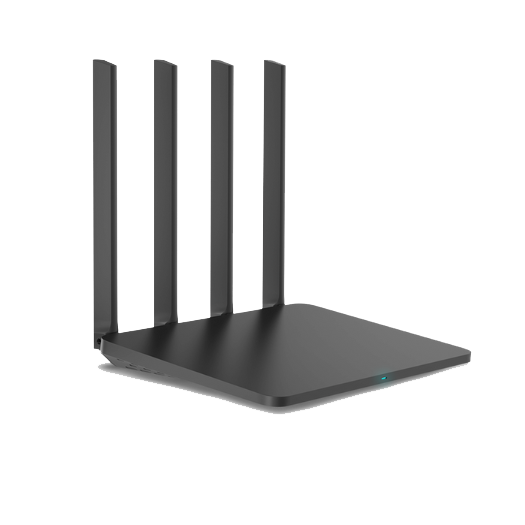 |
 |
 |
|---|---|---|---|
| Information | Basic | Standard | Premium |
| Network Source for RS5: Ethernet Cable | Yes | Yes | Yes |
| Network Source for RS5: 4G USB | Yes | No | Yes |
| Network Source for RS5: iPhone | Yes | No | Yes |
| Network Source for RS5: SIM Slot | No | No | Yes |
| Number of LAN Ports | 2 | 3 | 3 |
| Frequency Bands | 2.4Ghz – 5Ghz | 2.4Ghz – 5Ghz | 2.4Ghz – 5Ghz – 6Ghz |
| Wi-Fi Strength and Range | Average | Strong | Very Strong |
| Automatic Band Selection for Devices | Yes | Yes | Yes |
| Connection + Bypass Algorithm | 1 Algorithm x 1 Bypass | 2 Algorithms x 3 Bypasses | 2 Algorithms x 3 Bypasses |
| Supported Connections | Socks5 – HTTP/HTTPS | Socks5 – HTTP/HTTPS – OpenVPN – Wireguard |
Socks5 – HTTP/HTTPS – OpenVPN – Wireguard |
| DNS Encryption – DNS Obfuscation System | No | Yes | Yes |
| Tracking Protection (ThreatMetrix, Akamai,…) | No | Yes | Yes |
| Router MAC Address Spoofing | Yes | Yes | Yes |
| WebRTC Support | Yes | Yes | Yes |
| Automatically adjust Router time zone according to Proxy | Yes | Yes | Yes |
| Block scanning of internal devices | Yes | Yes | Yes |
| Block Tracert | Yes | Yes | Yes |
| Auto update | Yes | Yes | Yes |
| Supports blocking hosts on request | No | Yes | Yes |
| Price | 500 USD | 700 USD | 1000 USD |
| ORDER | ORDER | ORDER |
INFORMATION AND FREQUENTLY ASKED QUESTIONS ABOUT ROUTERSOCKS5
1. Connect directly with SOCKS5, HTTP, HTTPS and Wifi+LAN to the device.
2. Supports TCP and UDP connection methods.
3. WebRTC Support for Proxies.
4. ISP Primary DNS Route (ISP from Proxy’s carrier) (DNS comes from Proxy’s own city)
5. Secondary DNS route allows customization to maximize Proxy speed.
6. Fake All MAC + Changer to millions of Router codes of all major brands.
7. Automatically selects the 2.4G or 5G Wifi band that is most compatible with the connected device.
8. Automatically adjust RouterSocks5’s time zone to the Proxy’s time zone.
9. Allows you to supply network to RouterSocks5 from your home wired network or 4G USB or Android or iOS phone for convenience on the go.
10. Block Gate from scanning internal network LAN IP.
11. Block Tracert (Do not let the Gate determine the path from the source to the destination of the data packet)
12. Comprehensive combination + synchronization, maximum performance increase in speed and Fake indicators when working with Proxy.RouterSocks5.Net
And a series of other hidden features to suit our customers 🅤🅖.
Remember: Technology is always evolving and constantly changing.
Therefore, our system always updates algorithms, new features and optimizes the system to provide the best results for users.
Don’t just sell the version and use it forever, so it will soon be outdated.
Yes, it works well with all networks worldwide.
Configured with flexible connection methods, you can take it anywhere you want.
You can use the following forms to grant input permissions for internet use to RouterSocks5:
1. Use a network cable (plugged from the network modem or network port splitter.)
2. Use 4G USB
3. Use connection sharing mode from your iPhone
4. Use tethering mode from Android phone
RouterSocks5 will then connect to your Socks5 installation.
Output:
1. Broadcast the connected Socks5 transmission to Wifi
2. Broadcast the connected Socks5 transmission to the LAN port
This must see where your computer is plugged into the network cable?
If your computer is plugging a network cable into the network operator’s Modem, you should plug it in as follows:
One end of the network cable will be plugged into the LAN port on the network operator’s modem, the other end will be plugged into the WAN port (Blue port on RouterSocks5).
If your computer is plugging a network cable into a network splitter, you should plug it in as follows:
One end of the network cable will be plugged into the Network Port Splitter, the other end will be plugged into the WAN port (Blue port on RouterSocks5).
Very simple, you just need to insert the SIM into the 4G USB, then plug the 4G USB into the USB port on RouterSocks5.
After RouterSocks5 is granted Internet access, you need to open our software on your computer to control and set up the connection for RouterSocks5.
Step 1: Enter Socks5 information then click on the Start Socks box
A message will then appear asking you to wait 1 minute
(During this 1 minute RouterSocks5 will connect to your Socks5 address and record its IP address parameters such as IPV4, City, State/Region, ISP, DNS, GEO, … to the Router.)
Step 2: Then you can select whichever Router brand you want to fake from the list.
Click Random MAC to randomize the Router models of the brand you have chosen.
Click Change Router to start fake Router.
So the installation is complete, you can use Wifi and LAN from RouterSocks5 to use the internet via Socks5.
The tool is fully automated by code to provide the easiest experience for users, so even people who are less tech-savvy can use it. You just need to fill in the parameters and it will work according to your wishes.
After you complete the installation as instructed above, you just need to use your phone, tablet, laptop, … to connect to RouterSocks5’s Wifi, it will default to using the Socks5 connection you installed. .
After you complete the installation as instructed above, you just need to plug the network cable from the device you want to connect to the LAN port on RouterSocks5 and it will default to using the Socks5 connection you installed.
Unit price: 10,000,000 VND / 1 Set of equipment
Include :
01 Router Set
01 Administration Tool (Free continuous bypass technology updates for the first year)
After the first year, a fee of 300k / 1 month / 1 Router will be charged
Customers should consider the following to be clear from the beginning. If they do not agree, please use another party’s service.
1.If you are concerned about maintenance fees, you should understand:
…No one sells a 10 million device set but always updates the new algorithm to run according to Gate and continuously updates it for you.
…I also need funds to maintain my life.
…With money comes responsibility.
…Try your best to get the job done for the customer. If the customer gets the job, we also get the maintenance fee. It’s a win-win situation for both sides.
2. Customers who buy this item don’t need to be told what to do.
…Going to TUT with good odds, it’s normal to make billions of dollars a month, but if you’re still wasting a few small coins, I’ll understand and won’t accept you.
Deposit 500k COD shipping, receive the goods, pay the remaining 9 million.
(Free unpacking and inspection is allowed)
To order please contact:
Chat FaceBook Page: https://m.me/170165020019502
Chat Telegram : https://t.me/RouterSocks5
1. 1 for 1 exchange warranty for the first 3 months if due to manufacturer error.
2. If the customer automatically pokes into the RouterSocks5 hardware, we will deny the warranty.
3. Each house has different network infrastructure so:
After receiving the goods, we will support customers to set up the system for free during the first installation.
After setup is complete, you can use any computer on the same LAN to control RouterSocks5.
And the computer can freely reinstall Windows if desired, without affecting the previously installed system.
4. With simple math problem:
…Setting up the system for 1 person will take about 1 hour to 2 hours.
…Let’s say it’s fast, 1 hour
…10 hour work day to complete setup for about 10 people.
Therefore, customers who buy, sell, exchange, or lend products have nothing to do with us.
If you want to set up again, we will charge 1 million/setup fee.
METHOD OF OPERATION
Proxy Service
Contact Admin
🏆Rotating 5G LTE Proxy, No traffic limit, No ip rotation limit.
✨With millions of IPs, you don't have to worry about duplicates, the IP is super clean, no Spam or Fraud.
✨WebRTC support to work flawlessly with checkout and interaction with social networks


